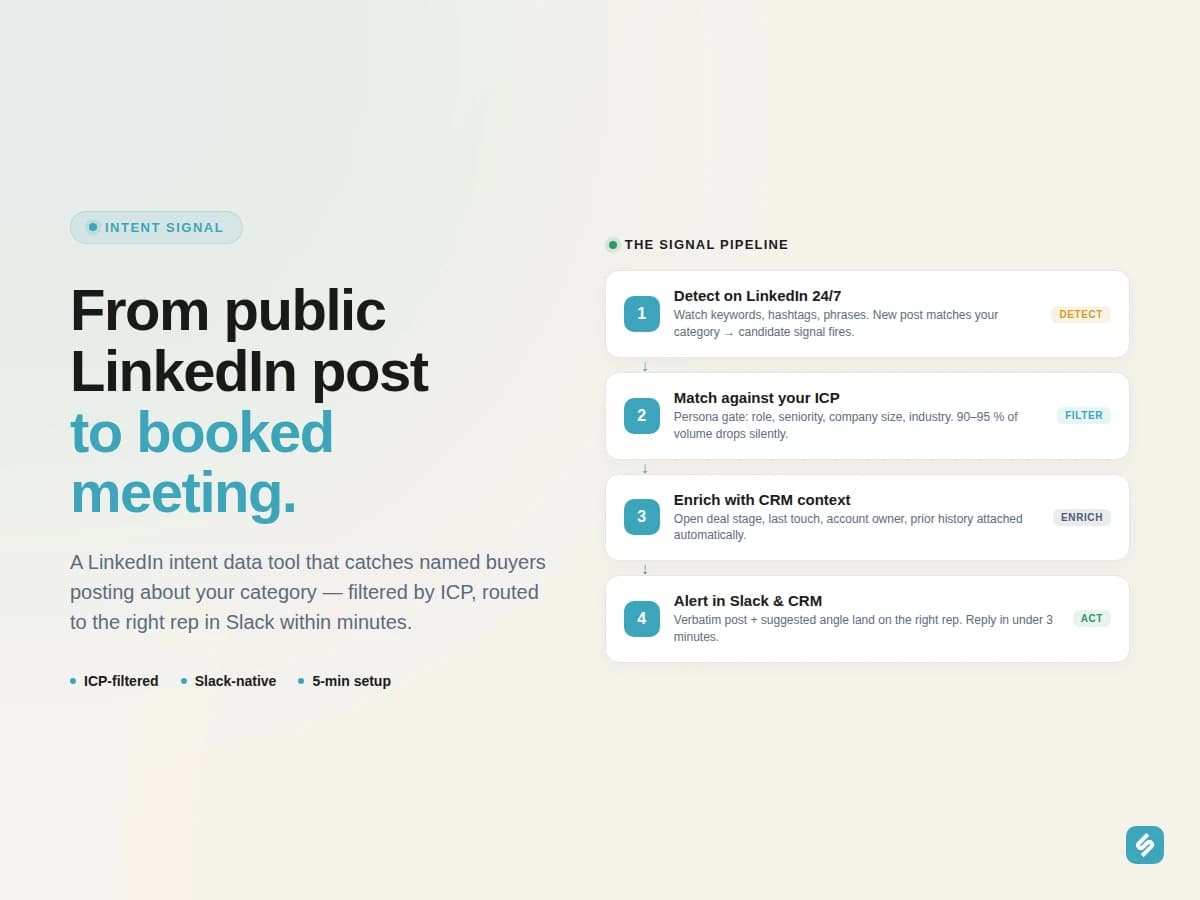
A LinkedIn intent data tool turns the most underused buying signal in B2B, the public post, into a structured outbound queue for your sales team. Every day, decision-makers in your category write about the exact problem you solve: a recent migration, a hiring crunch, a stack consolidation, a frustration with their current vendor. Most of those posts get scrolled past. A good intent data tool catches them in real time, filters by your ICP, and ships a qualified alert to the right rep inside Slack before the cold-email crowd shows up. This page sits inside our broader playbook on how signal intelligence is changing prospecting.
What is a LinkedIn intent data tool?
Traditional intent data platforms watch anonymized B2B web traffic and tell you "an account in your ICP was researching CRM solutions this week." Useful, but blunt: you don't know who, you don't know which buying-committee role, and you don't know what triggered the research. A LinkedIn intent data tool does the opposite: it watches public LinkedIn posts in real time and tells you, by name, who is publicly raising a hand about a pain you solve, with the exact wording they used.
Three things make it different from generic intent data:
- Named contacts, not anonymized accounts. The signal comes with a person, a role, a company, a LinkedIn URL, and the verbatim post.
- Public language, not inferred intent. The buyer literally wrote what they want. No probabilistic guess.
- Stackable with other signals. A keyword post becomes 10× more actionable when combined with a recent job change or a competitor's rep engaging the same account.
"We thought we were doing intent data because we had 6sense. Two months into the keyword agent, we realised we'd been missing the most obvious signal of all: people literally typing the problem we solve, in public.", Sillage customer, B2B SaaS, 180 employees

Keyword detected on a target account
Sarah Martin from Doctolib engaged with your competitor on LinkedIn
Why generic intent data fails for B2B sales on LinkedIn
Most platforms in the intent-data category were not designed for LinkedIn-native sourcing. When you point them at the channel where your buyers actually spend 30-60 minutes a day, three gaps appear:
- No content layer. They count visits to your competitor's pricing page. They don't see the prospect publicly complaining about that competitor in a LinkedIn comment.
- No role granularity. "Someone at Acme researched CRM", but is it the intern or the VP RevOps? On a LinkedIn post, the role is right there in the byline.
- Operational dead-end. The signal lands in a dashboard. Nobody copies it into Salesforce. The intent rots inside a SaaS contract nobody renewed.
A LinkedIn-native intent data tool inverts the stack. It starts from your CRM and your defined Personas, watches LinkedIn continuously for keyword and hashtag mentions that match your category, and only surfaces signals where the author matches both your ICP and an account you care about. The "boring inbox" of 5-15 high-conviction alerts per rep per day, not a 4 000-row dashboard.
| Capability | Generic intent data | LinkedIn intent data (Sillage) |
|---|---|---|
| Signal source | Anonymized web traffic + 3rd-party data co-ops | Public LinkedIn posts, comments, hashtags |
| Granularity | Account-level, probabilistic | Person-level, verbatim quote |
| Outreach material | You guess what they researched | You quote what they wrote |
| Distribution | Dashboard / weekly digest | Slack + Salesforce / HubSpot, real time |
| Setup | Configuration weeks | 5 minutes |
How LinkedIn intent data actually works
Three layers separate a tool that just emails you noisy keyword alerts from one that consistently moves pipeline.
Layer 1, Real-time keyword and hashtag monitoring
The system watches LinkedIn continuously for the keywords, phrases, and hashtags you defined. "CRM migration", "hiring RevOps", "intent data quality", "alternatives to [your competitor]", "Salesforce to HubSpot", "outbound at scale", each tracked phrase fires a candidate signal the second a post matches.
The candidate signal at this stage is high-volume and noisy. The filter happens next.
Layer 2, ICP qualification at the source
Every candidate signal is checked against your Personas: role, seniority, company size, industry, geography. A junior product designer posting about "CRM migration" gets dropped silently. A VP RevOps in a 500-employee SaaS posting the same phrase gets surfaced.
This single filter removes 90-95 % of raw LinkedIn volume. What remains is genuinely your audience, genuinely talking about your category.
Layer 3, CRM enrichment and routing
Each surviving alert is composed with full CRM context: existing relationship, deal stage if any, last touchpoint, account owner. It lands in the dedicated Slack channel and as a task on the right rep's queue, never in a separate dashboard. The rep crafts a 3-minute reply that quotes the prospect's own words.
For the lead-scoring layer that ranks every keyword signal, see advanced lead scoring beyond demographics.
Three patterns of keyword signals that convert
Not every keyword post deserves a sales touch. After thousands of routed alerts, three patterns reliably turn into meetings.
Pattern 1, The pain post
A prospect publicly venting about a frustration that your product directly solves. "Three months in and our [generic CRM] is still impossible to report on" is a buying-intent gesture as clean as it gets. Quote the post in the first line of your reply and you have a meeting in 48 hours.
Pattern 2, The migration mention
A decision-maker announcing or hinting at a stack consolidation. "We're consolidating from three tools to one this quarter" is a 30-day buying window opening in public. Combined with a recent job change at the same account, you have a triple-stacked signal.
Pattern 3, The competitor callout
A prospect publicly comparing or critiquing a vendor that competes with you. "Anyone else find [competitor] impossible to integrate with Salesforce?" is an open invitation to pitch. Stack it with competitor activity monitoring and you intercept the deal mid-evaluation.
| Pattern | Typical post wording | Buying window | Best follow-up angle |
|---|---|---|---|
| Pain post | "Three months in and our [generic CRM] is still impossible to report on" | 1–7 days | Quote the post in the first line, empathy + a one-paragraph alternative. |
| Migration mention | "We're consolidating from three tools to one this quarter" | 30 days | Share a 1-pager comparison + a 15-minute call slot in week 1 of the move. |
| Competitor callout | "Anyone else find [competitor] impossible to integrate with Salesforce?" | 2–4 weeks | Reply publicly with a calm fact + DM a customer story of the same migration. |
For a deeper dive on the tactical play, our step-by-step guide on how to book meetings with people who publicly post about your problem on LinkedIn takes you from agent config to first reply template.
The workflow, from public post to qualified meeting
A working LinkedIn intent data motion has four discrete steps. None require the rep to leave Slack or the CRM.
- Detect. The Keyword Detection agent watches your defined keywords/hashtags on LinkedIn 24/7.
- Match ICP. Every match runs through Personas. Non-fits are dropped silently.
- Enrich. CRM context attached (open deal, last touch, account owner, prior history).
- Alert. Slack notification + CRM task on the right rep, with the verbatim post and a suggested outreach angle.
End-to-end, from public post to outbound message, well under two hours when configured properly. Compared to "scroll LinkedIn at 4pm and copy interesting posts to Notion", that's a 20x compression of cycle time.
Combining LinkedIn intent data with the rest of the Sillage stack
Keyword signals compound when stacked with other buying signals on the same prospect. Sillage cross-references the Keyword Detection agent with seven other agents.
| Agent | What it adds to a keyword post signal |
|---|---|
| Job Updates Detection | New role + public pain post = 30-day buying window confirmed |
| Champion Tracking | A former customer just landed at the company posting the keyword |
| Competitor's Activity | A rival rep is engaging the same prospect, race condition |
| Content Engagement | Prospect engaging with category content + posting about pain = active research |
| Influencer Engagement | Prospect engaging with category KOLs in the same week |
| Hiring Signals | The account is recruiting roles tied to the product they are venting about |
For the broader content-engagement layer, see B2B LinkedIn social listening tool. For the named-champion variant, see B2B champion tracking software.
What Sillage does specifically for LinkedIn intent data
Three things separate a B2B-native LinkedIn intent data tool from generic intent platforms:
- Persona filter at the source. Without an automatic ICP gate, LinkedIn keyword detection drowns reps. Sillage filters every candidate before it ever reaches a human.
- No new tool, no new tab. Alerts land in Slack and your CRM. There is no separate dashboard for AEs to remember to open, which means adoption stays above 90 % at six months, where standalone intent platforms collapse.
- Cross-signal correlation. A standalone keyword post is interesting. A keyword post from someone who just changed jobs at an ICP account a competitor is also working = a deal forming in front of you. Sillage stacks signals automatically.
If you are evaluating the broader market before committing, our roundup of the best AI tools for B2B prospecting covers the main alternatives. For the strategic framework behind the stack, see how signal intelligence is changing prospecting. And join us at the Agentic GTM Hackathon in Paris (July 2026) to see live builds plugging AI agents into this same keyword detection feed.
Frequently asked questions
What is a LinkedIn intent data tool?
A LinkedIn intent data tool continuously monitors public posts, comments, and hashtags on LinkedIn for keywords that indicate buying intent in a B2B category, qualifies the author against an Ideal Customer Profile, and routes matched signals to sales reps in real time. It differs from generic intent data, which tracks anonymized web traffic at the account level.
How is LinkedIn intent data different from competitor monitoring?
A competitor monitoring tool specifically watches your competitors' engagement and employee activity. LinkedIn intent data is broader, it watches keyword and hashtag mentions across the whole platform, regardless of source. The two work best together inside the same platform.
What keywords should we monitor?
Specific phrases your buyers actually use beat generic terms every time. "Salesforce to HubSpot migration", "alternatives to [your competitor]", "hiring RevOps", "outbound at scale", "intent data quality" all outperform "CRM" or "sales tools". Start with 10-20 focused phrases and expand based on signal quality.
Does it integrate with Salesforce and HubSpot?
Yes. Keyword signals are enriched with CRM context (deal stage, last touchpoint, account owner) and routed as Slack alerts and CRM tasks natively. No Zapier or middleware required.
How does ICP filtering work?
Personas defined inside Sillage (role, seniority, company size, industry, geography) act as a gate on every detected post. Non-matching posts are dropped silently, your reps never see them. The unmatched 90-95 % of LinkedIn keyword volume disappears before it reaches a human.
Can keyword signals be stacked with other buying signals?
Yes, and this is where the leverage compounds. A keyword post combined with a recent job change, a competitor's rep engaging the same account, or a KOL engagement creates a triple-stacked signal that justifies a same-day outreach. Sillage handles the stacking automatically across all eight signal agents.
How long does setup take?
About five minutes for the first Keyword Detection agent: connect the CRM, define the Personas, paste the keywords/hashtags to monitor, choose the Slack channel for alerts. No engineering involvement required.
Ready to turn public LinkedIn posts into a structured outbound queue? Book a demo and see Sillage's Keyword Detection agent inside Slack and your CRM.
Book a demo
Related plays
LinkedIn intent data is one of eight signal agents in the Sillage stack. Most teams stack it with:
- B2B LinkedIn social listening tool, broader category-level engagement beyond named keywords.
- B2B LinkedIn competitor monitoring tool, pair keyword signals with competitor activity on the same accounts.
- Real-time job change alerts software, keyword post + fresh role = top-tier signal.
- B2B champion tracking software, re-engage warm contacts who post about your category.
- B2B KOL tracking & influencer marketing tool, detect when keyword posters also engage category creators.
- B2B hiring signals software, pair public pain posts with hiring waves on the same account.
- Account-based signals tool, consolidate keyword posts with every other signal touching the account.
- B2B signal-based selling platform, the full eight-agent platform context.